Systeme.io Webinars - How Evergreen Webinar Funnels Work (2026)
Systeme.io Webinars: The Short Answer
Systeme.io runs evergreen webinars: you record your presentation once, and systeme.io plays it on a schedule for each new registrant, with registration pages, reminder emails, replay pages and an offer built in. Evergreen webinars are available on the Webinar plan ($47 a month) and the Unlimited plan ($97 a month).
There's one important limit. According to systeme.io's help center, it currently supports automated webinars only, not live ones. If you want to present live and take questions in real time, you'll pair systeme.io with a live webinar tool. If you want a webinar that sells while you sleep, systeme.io handles the whole funnel.
Run Your Webinar Funnel in One Place
Registration, reminders, replay and offer pages all live in your systeme.io account.
Try Systeme.io FreeHow an Evergreen Webinar Funnel Works
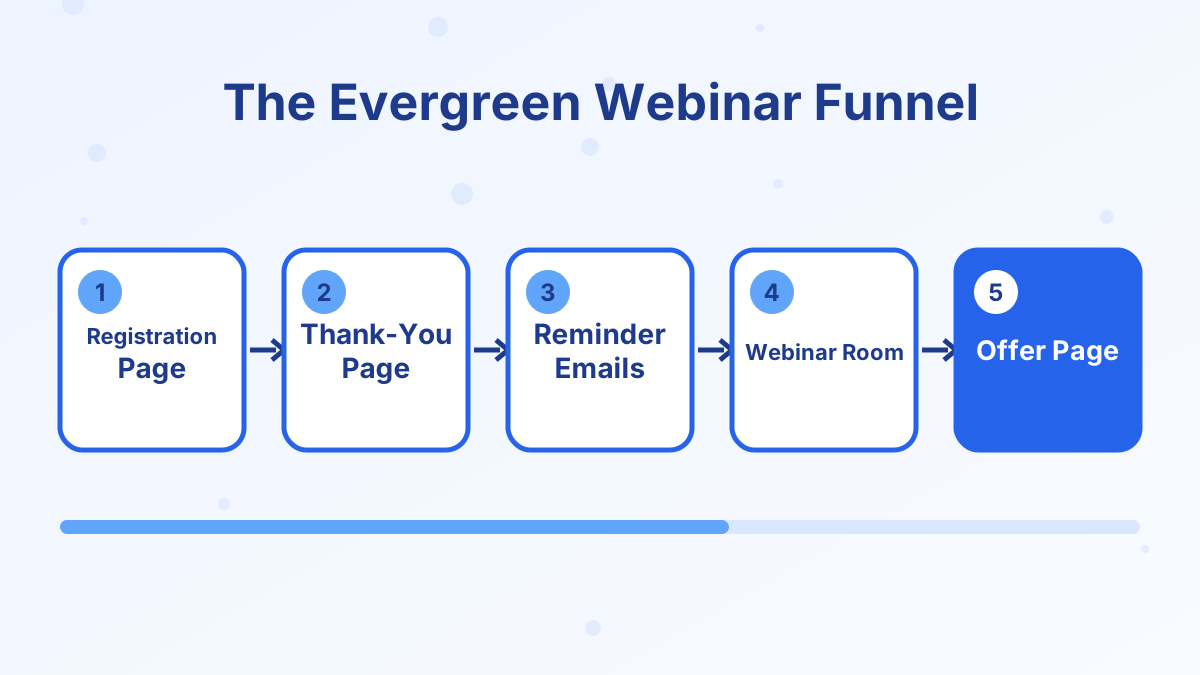
When you create a funnel, you pick "Run an evergreen webinar" as the goal. Systeme.io then sets up the core steps for you: a registration page, a thank-you page and the webinar broadcast page where the recording plays.
Around those pages, systeme.io's webinar tools include automatic reminder emails, such as one an hour before, one ten minutes before and a replay link afterwards, plus replay pages with countdown timers and one-click offer pages connected to your checkout.
From the registrant's point of view, it feels like signing up for a scheduled event. From yours, it's a sales presentation that runs every day without you.
Which Plans Include Webinars
| Plan | Monthly price | Evergreen webinars |
|---|---|---|
| Free | $0 | No |
| Startup | $17 | No |
| Webinar | $47 | Yes |
| Unlimited | $97 | Yes |
The Webinar plan also raises your limits to 10,000 contacts, 50 funnels and 20 courses, which suits creators who sell several products through webinars. See our systeme.io pricing guide for the full comparison.
How to Set Up a Systeme.io Webinar
- Record your presentationPrepare a 30 to 60 minute training that teaches something useful and ends with your offer.
- Create the funnelChoose "Run an evergreen webinar" as the funnel goal and give it a name.
- Edit the registration pageWrite a headline that promises a specific result, and keep the form short.
- Set the scheduleDecide when sessions run, such as every day at a set time or shortly after signup.
- Upload the video to the webinar pageAdd your recording to the broadcast step.
- Set up reminders and replayConfigure reminder emails and a replay page with a genuine deadline.
- Connect the offerLink a sales page or order form, and add an order bump or upsell if it fits.
- Test as a registrantRegister with a test email and go through every step.
The vendor estimates the whole setup typically takes two to four hours once your video is ready. Writing and recording the presentation is the bigger job.
What Makes a Webinar Sell
A good automated webinar is a useful lesson first and a pitch second. These elements matter most:
A Specific Promise
"How to get your first 10 coaching clients" beats "Grow your business."
Real Teaching
Give genuine value in the first two-thirds. People buy from presenters who helped them.
A Clear Offer
Explain exactly what's included, who it's for, the price and the next step.
An Honest Deadline
A replay that expires or a bonus with a real end date gives a reason to act now.
For structure and email timing, read our guide to webinar funnels.
Evergreen vs Live Webinars
Evergreen webinars scale. You record once and every new lead sees the same polished presentation at a convenient time. The trade-off is interaction: there's no real-time Q&A, and some audiences prefer live events.
Live webinars build stronger connection and are great for launches, but they take your time every session. Many creators use both: a live webinar during a launch, then the best recording as their evergreen funnel.
Since systeme.io supports evergreen webinars only, run live sessions in a dedicated live webinar tool and use systeme.io for registration pages, emails and checkout through integrations.
Honest Expectations
Webinars don't sell by themselves. You still need traffic to the registration page, a presentation that earns trust and an offer people want. Track three numbers: registration rate, show-up rate and sales from attendees.
If show-up rates are low, improve your reminders and the registration promise. If attendees don't buy, look at the offer and the pitch. Our guide to sales funnel metrics explains how to measure each step.
Systeme.io Webinars FAQs
Can you run live webinars on systeme.io?
No. Systeme.io's help center says it currently supports automated (evergreen) webinars only.
Which systeme.io plan do you need for webinars?
Evergreen webinars are available on the Webinar plan at $47 a month and the Unlimited plan at $97 a month.
Can you sell during an evergreen webinar?
Yes. You can connect offer pages and checkout to your webinar funnel, including one-click offers.
Does systeme.io send webinar reminders?
Yes. Webinar funnels include automatic reminder emails and replay emails.