Marketing Automation for Small Business - 8 Workflows to Set Up First and How to Run Them (2026)
What Marketing Automation Means for a Small Business
Marketing automation is software that sends the right message or takes the right action automatically when something happens. A new subscriber gets a welcome email. A buyer gets access to their course. Someone who leaves checkout gets a reminder. A customer who hasn't opened anything in months gets a check-in.
For a small business, automation isn't about complex enterprise systems. It's about handling the repeat tasks you already know you should do, consistently, without typing each message yourself. That frees your time for the work only you can do, such as creating products, serving clients and building relationships.
What it means for you: a handful of well-built workflows usually delivers most of the value. You don't need dozens of automations to see results.
Start with welcome, purchase and recovery workflows
Build a welcome sequence, purchase follow-up and abandoned-checkout reminder first, using a platform where forms, email and checkout share one contact record. Add more workflows only once these run smoothly.
How Marketing Automation Works
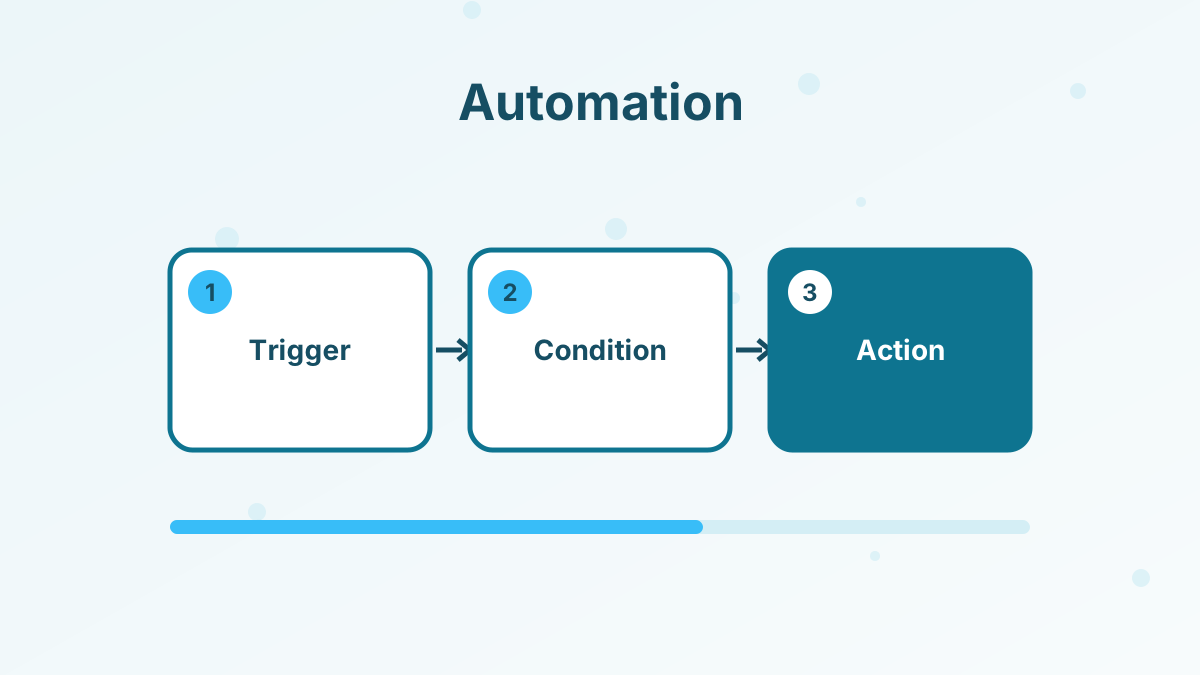
Almost every automation follows the same pattern: a trigger starts it, optional conditions decide who it applies to and actions do the work.
| Part | What it is | Examples |
|---|---|---|
| Trigger | The event that starts the workflow | Form submitted, product purchased, tag added, course module completed |
| Condition | A filter that decides who continues | Has a specific tag, bought a product, opened an email |
| Action | What happens automatically | Send an email, add a tag, enroll in a course, subscribe to a campaign |
| Delay | Time between steps | Wait one day, wait until a date |
In systeme.io, for example, automation rules connect a trigger, such as a funnel form subscription or a purchase, to actions such as adding a tag, subscribing the contact to an email campaign or enrolling them in a course. The free plan includes one automation rule, and paid plans add more. See systeme.io automation rules.
8 Workflows to Set Up First
1. Welcome Sequence
When someone joins your list, send a short series of emails that delivers the free resource, introduces you, shares your best content and presents your offer. This is the single most valuable automation for most small businesses. See welcome email sequence.
2. Purchase Follow-Up
After a purchase, send a thank-you with access details, a getting-started guide and a check-in a few days later. Good onboarding reduces refunds and creates happy customers who buy again.
3. Abandoned Checkout Reminder
When someone starts checkout but doesn't finish, a reminder can bring them back. Keep it helpful: restate the value, answer common objections and include a direct link back to checkout. See abandoned cart emails.
4. Lead Tagging and Segmentation
Tag contacts based on what they sign up for, click or buy. Tags let you send relevant emails rather than the same message to everyone. See email list segmentation.
5. Course and Product Onboarding
Enroll buyers in the right course automatically and send reminders as they progress. A nudge when someone stalls on a module can help them finish, which leads to better results and better reviews.
6. Appointment Reminders
If you take bookings, automated confirmations and reminders reduce no-shows. Systeme.io's booking calendar sends confirmations and connects with Google Calendar, Google Meet and Zoom.
7. Re-Engagement
Contacts who haven't opened emails for a long time hurt deliverability. A short re-engagement sequence asks whether they still want to hear from you, then removes those who don't respond. See email deliverability tips.
8. Upsell and Cross-Sell
Customers who bought one product are often good candidates for a related one. A follow-up sequence a few weeks after purchase can introduce the next step naturally. See order bumps and upsells.
How to Get Started Step by Step
- Map your customer journeyList the steps from first visit to repeat customer and note where you repeat the same messages manually.
- Pick one workflowStart with the welcome sequence or purchase follow-up.
- Write the emailsDraft each message with one clear purpose and call to action.
- Build the automationSet the trigger, conditions, delays and actions in your platform.
- Test it yourselfSign up, buy or book as a customer would and check every message and action.
- Measure and improveWatch opens, clicks and conversions, then refine the weakest step.
Choosing an Automation Tool
Small businesses usually do best with tools that combine email, forms, landing pages and checkout, because automations can then react to every important action without connectors.
| Feature | Why it matters |
|---|---|
| Visual workflow or rule builder | Easy to set up without technical help |
| Triggers from forms, purchases and courses | Automations respond to real customer actions |
| Tags and segmentation | Send relevant messages |
| Built-in checkout and courses | Purchases and access happen in one system |
| Fair pricing as your list grows | Automation shouldn't become expensive as you succeed |
Systeme.io combines funnels, email, checkout, courses, a booking calendar and SMS in one account, with unlimited email sends on every plan and 0% transaction fees. Its free plan lets you test automation before upgrading for more rules. See systeme.io email marketing.
Example: A Simple Automation Map for a Coach
Here's how the first few workflows fit together for a coach who sells a group program, using illustrative timings you'd adjust to your own audience.
| When this happens | Automatically do this | Goal |
|---|---|---|
| Visitor downloads a free workbook | Tag "workbook", start five-email welcome sequence | Build trust and introduce the program |
| Subscriber clicks the program link | Tag "interested" | Identify warm leads |
| Interested subscriber doesn't buy within a week | Send a short FAQ email and a booking link | Answer objections |
| Prospect books a discovery call | Send confirmation and reminder before the call | Reduce no-shows |
| Client buys the program | Enroll in the course area, start onboarding emails | Fast, smooth start |
| Client completes the final module | Send feedback request and next-step offer | Testimonials and repeat sales |
Each row is a small, understandable rule. Together they form a system that nurtures, sells and onboards while the coach focuses on sessions.
Example: A Simple Automation Map for a Digital Product Seller
A seller of templates or ebooks has a shorter journey, but the same principles apply.
- Free sample downloadTag the contact by topic and send three helpful emails ending with the paid product.
- Checkout started, not finishedSend one reminder with the product's main benefit and a link back.
- Purchase completedDeliver the files, then send a how-to-use email two days later.
- Two weeks after purchaseIntroduce a related bundle or the next product in the range.
- No opens for several monthsSend a re-engagement email and clean the list if there's no response.
What it means for you: map your own journey in a simple table like these before building anything. The map shows which workflows matter most and keeps your automations easy to maintain.
Personalization Without Complexity
Automation doesn't have to feel robotic. Use the subscriber's first name sparingly, write like a person and send messages based on what people actually did. A welcome email that references the specific guide someone downloaded feels far more personal than a generic newsletter.
Segment by interest and behavior rather than building dozens of branching paths. Two or three meaningful segments are usually enough for a small business.
Measuring Automation Results
Track whether each workflow does its job. A welcome sequence should turn new subscribers into engaged readers and some into customers. A checkout reminder should recover a share of abandoned purchases. An onboarding sequence should increase course completion and reduce refund requests.
Review results every month or two, update outdated content and remove steps that don't help.
Common Marketing Automation Mistakes
Common mistakes include automating before you know what to say, building too many workflows at once, forgetting to test, sending the same message to everyone, ignoring unsubscribes and inactive contacts, and setting automations and never reviewing them. Another is over-automating relationships that need a personal touch, such as high-value sales conversations.
Automate Your Marketing on Systeme.io
Forms, email, checkout, courses and automation rules in one account, free to start.
Try Systeme.io FreeMarketing Automation for Small Business FAQs
What is marketing automation for small business?
Software that sends messages or takes actions automatically when customers do something, such as subscribing or buying.
Which automation should a small business set up first?
A welcome email sequence, followed by purchase follow-up and an abandoned checkout reminder.
Is marketing automation expensive?
It doesn't have to be. Platforms like systeme.io include automation with email, funnels and checkout, starting with a free plan.
Does automation make marketing feel impersonal?
Not if you write like a person and trigger messages based on real actions. Relevant, timely emails often feel more personal than broadcasts.
How many automations does a small business need?
Usually a handful. Start with three core workflows and add more only when they're running well.